What's VPN Containers?
With VPN Containers, you can:
- Open multiple isolated browser windows
- Connect each to a different VPN server
- Use multiple IPs simultaneously on one device

Feature Available On

Windows

macOS

Ubuntu
Prime Plan subscription required

How Does VPN Containers Work?
VPN Containers creates isolated browser environments, each with its own proxy connection to a different VPN server.
When you open a browser in a container, all traffic from that browser is routed through the selected VPN server, while your main system and other containers remain unaffected.
Each container maintains separate cookies, sessions, and browsing history, providing complete isolation between different browsing contexts.
When should you use VPN Containers?
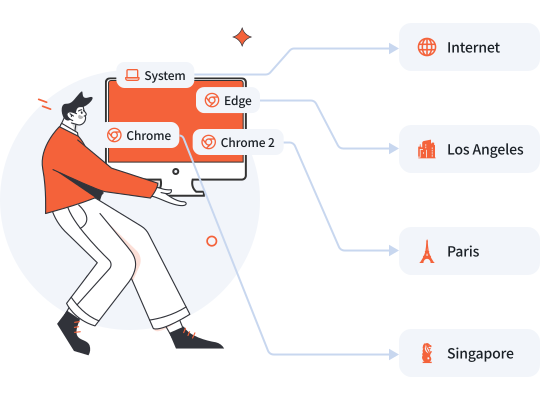
Managing Multiple E-commerce Stores
You need to manage different e-commerce stores from different exit IPs, and at the same time access local internet without VPN for daily work.
- Default: No VPN, use local internet for daily work
- Container A Browser: Connect to Los Angeles to manage Amazon.com
- Container B Browser: Connect to Singapore to manage Shopee
- Container C Browser: Connect to Paris to manage Amazon.fr
How to Setup VPN Containers

Enable VPN Containers
Open Surflare VPN client and enable VPN Containers feature.

Create Containers
Create multiple containers and select different server nodes for each.

Start VPN
Connect to VPN to activate all container configurations.

Open Browsers
Launch browser from each container to browse with different IPs.
VPN Containers requires Chrome or Edge browser installed on your system.
VPN Containers benefits you'll love

Use different IP addresses simultaneously on a single device for different tasks.

Keep browsing sessions completely separate with isolated cookies and history.

Choose Direct, Global, or Smart routing mode for each container independently.

Manage multiple accounts on the same platform without logging out or conflicts.

Direct mode containers bypass VPN for local traffic, maintaining full speed.

Switch between containers instantly without disconnecting or reconfiguring.
Multiple IPs, One Device
Run different browser sessions with different VPN locations simultaneously.