Get Surflare CLI for Linux
Terminal-based VPN client with interactive menu
- Interactive terminal UI and direct CLI commands — no GUI needed.
- Encrypts outbound traffic only — inbound connections like SSH remain unaffected.
- One-command installation on Ubuntu, Debian, Fedora, Rocky Linux and more.

What is a VPN for Linux?
A VPN for Linux creates an encrypted tunnel between your device and the internet, protecting your data from surveillance and hackers. For developers, sysadmins, and power users who value privacy, a VPN is essential for secure browsing, remote server access, and protecting sensitive operations.
Supported Linux Distributions
Surflare CLI supports x86_64 (amd64) architecture and requires nftables 0.9+.
 Debian 11+
 Rocky Linux 9+
 AlmaLinux 9+
 Arch Linux Rolling
How to install Surflare CLI
Requirements: x86_64 Linux with nftables 0.9+
Get Surflare CLI running on your Linux machine in minutes. Install, launch the interactive menu, and connect.

Step 1 - Get your Surflare subscription
Choose a plan and register your account to get started.
Get Started

Step 2 - Install via terminal
Run the one-line install command:
curl -fsSL https://www.surflare.com/static/linux-setup.sh | sudo bash 
Step 3 - Launch and connect
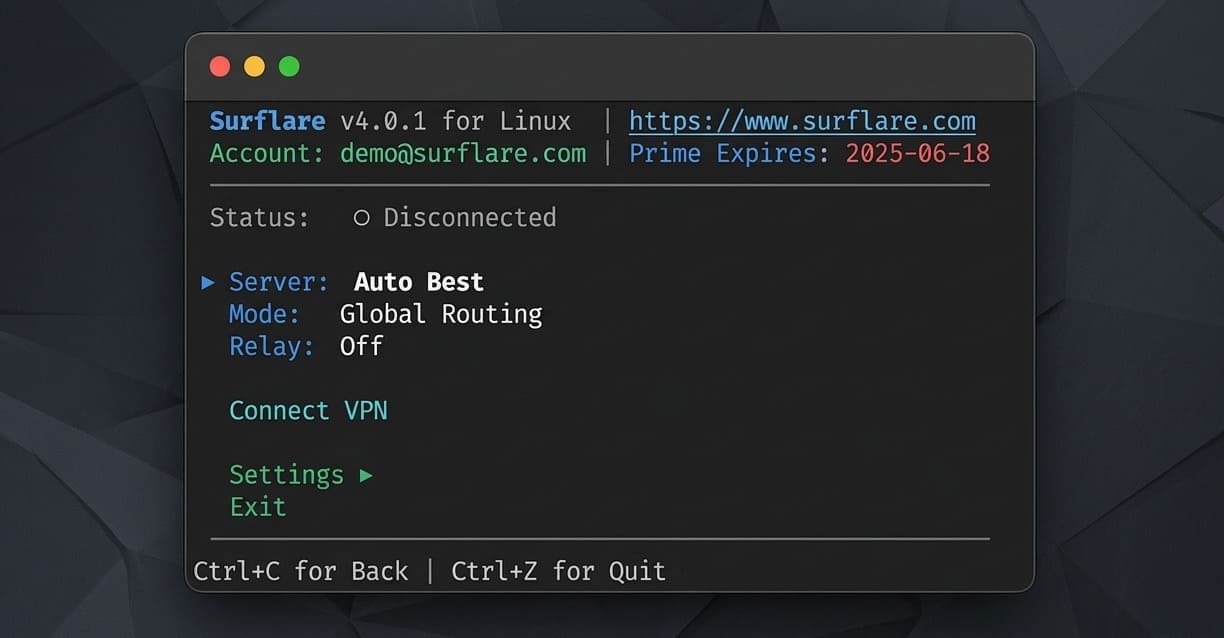
Launch the interactive menu to log in, select servers, and connect:
sudo surflare
Get started in minutes
Surflare CLI installs in seconds with a single command. Use the interactive terminal menu to browse servers, switch routing modes, and manage connections — or run CLI commands directly for scripting and automation.

Built for developers and tech professionals
Linux users demand more from their VPN. Surflare CLI delivers with an interactive terminal application designed for developers, system administrators, and security-conscious professionals who need reliable, fast, and private internet access.
- Secure SSH connections and remote server management
- Protect API calls and development traffic
- Safe access to cloud infrastructure and CI/CD pipelines
- No interference with your development workflow
Secure your Linux network traffic
Surflare CLI only intercepts outbound traffic. Your inbound connections — SSH sessions, web servers, API endpoints — continue to work normally without any interference.
- Outbound-only proxy — SSH, web servers, and listening services stay accessible
- Protect SSH, API calls, and development traffic
- Safe access on untrusted networks
- Zero-log policy — no activity tracking

Run your global business from Linux
Linux users in e-commerce, social media marketing, and live streaming trust Surflare to expand their reach. Operate international storefronts, manage overseas social accounts, and connect with audiences worldwide — all from your Linux workstation.
- Run TikTok Shop, Amazon, Etsy stores targeting different regions
- Go live on international platforms without geo-blocks
- Manage multiple seller accounts with separate IPs
- Access region-locked business tools and analytics

Respects the Linux philosophy
We understand Linux users value transparency, control, and privacy. Surflare CLI is designed with these principles in mind — no bloatware, no unnecessary permissions, just a clean terminal VPN that does its job.
- Lightweight CLI with minimal resource usage
- No telemetry or usage tracking
- Works seamlessly with your existing tools
- Regular updates and security patches
- Does not interfere with inbound traffic or listening ports

Linux-friendly support and risk-free trial
Our support team understands Linux. Get help from people who speak your language — whether it's troubleshooting installation issues or configuring advanced settings. Try Surflare risk-free with our money-back guarantee.
- 7-day money-back guarantee
- Technical support that understands Linux
- Detailed documentation and guides
- Active user community