How Does Smart Routing Work?
Smart Routing selectively routes only your chosen apps through VPN while keeping other traffic on your local internet, giving you the best balance of privacy and speed.
- Route popular apps and specific apps through VPN
- Customize routing rules as you need
- Easily switch to Global Routing

Feature Available On

Windows

macOS
Linux

Android

iOS
Chrome
Edge

Router
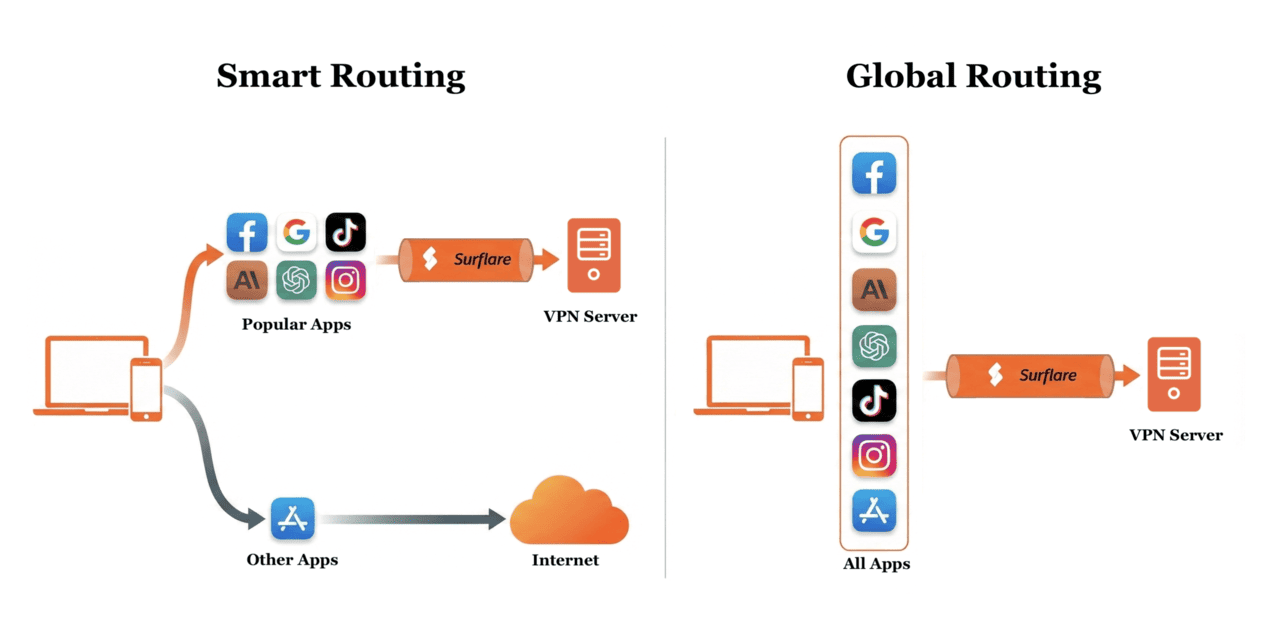
Smart Routing vs. Global Routing
Only routes traffic for popular apps through VPN, while other apps use your local internet directly.
Routes all app traffic through VPN for complete protection.
You can customize Smart Routing policies, however, generally you don't need to configure policies. When you enable Smart Routing, we provide default policies that work well for most users.

When should I use Smart Routing?
Smart Routing is ideal when you want to balance privacy and performance:
- Access region-restricted services like ChatGPT, Claude, Netflix through VPN
- Keep local services like banking and local websites on direct connection
- Reduce VPN load and improve speed for non-sensitive traffic
- Customize routing rules for specific apps or domains

When should I use Global Routing?
Global Routing is best when privacy is your top priority:
- Protect all your internet traffic with encryption
- Hide your real IP address from all websites and services
- Use public Wi-Fi safely with complete protection
- Simple setup with no configuration needed
Customize Smart Routing Rules
Set routing rules for each app on the Surflare App or Web Dashboard. Choose the Routing Action that fits your needs:

Traffic goes through VPN to protect privacy and bypass restrictions.

Traffic bypasses VPN for faster local access and better compatibility.

Block all connections to stop ads, trackers, and malicious sites.

Use system default and follow global routing rules.
How to enable Smart Routing or Global Routing?
Simply select "Smart" or "Global" when connecting to VPN. That's it!

Why use Smart Routing?

Control traffic routing for each app individually.

Surflare automatically recognizes and categorizes popular apps.

Create precise rules using domain names or IP addresses.

Keep local traffic on direct connection for maximum speed.
Block specific apps, domains, or IPs as you need.

Default policies work well for most users, no configuration needed.
Frequently Asked Questions
Control Your Traffic
Route each app exactly how you want - through VPN, directly, or blocked.